
Color and black-and-white charts can describe exactly the same pattern. The best choice is the one that makes symbols and your progress marks easiest to distinguish.
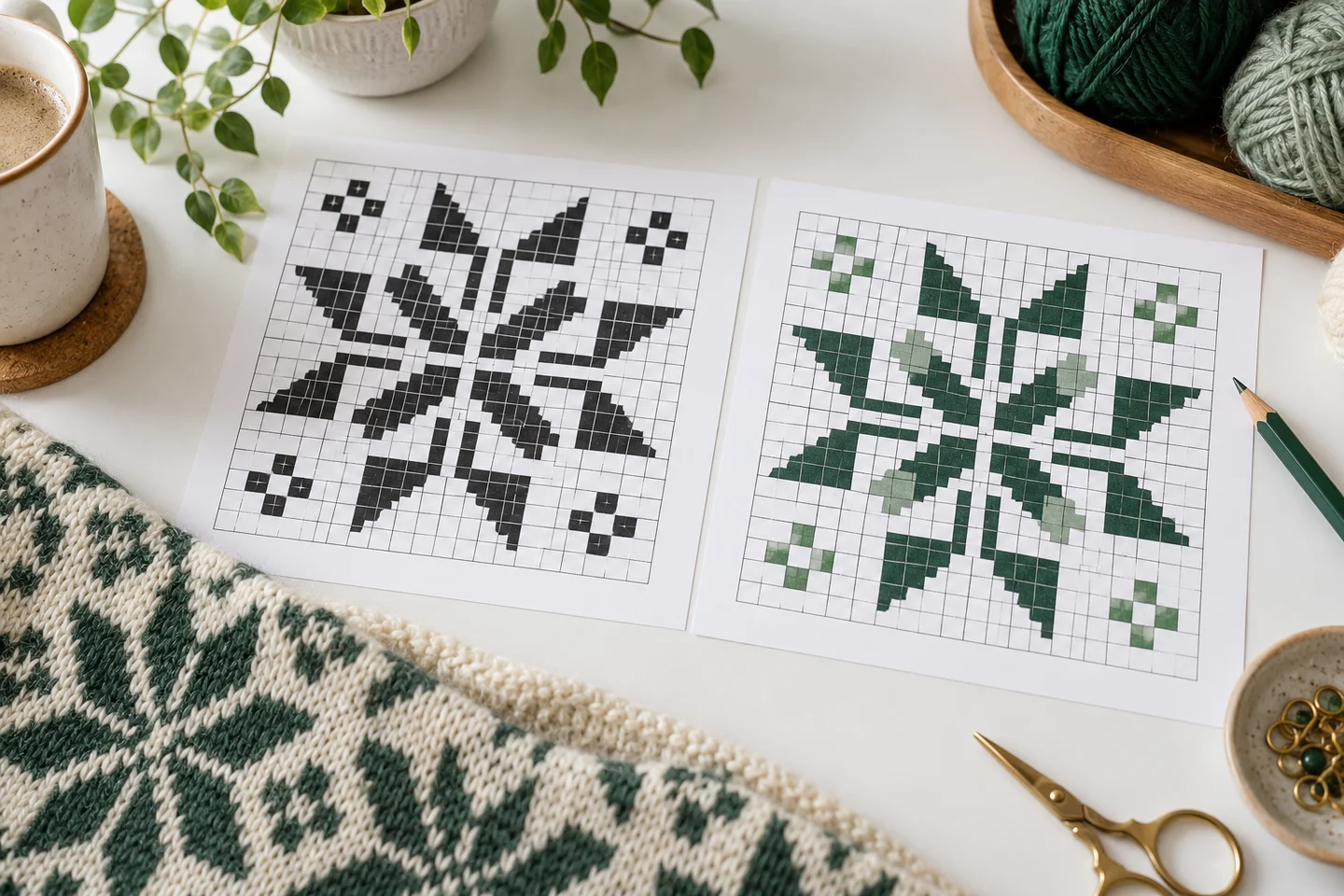
What color adds
Colored cells give a quick visual sense of the motif. They can help you locate a region and compare it with the cover preview. However, similar colors can print almost identically, and dark fills can reduce symbol contrast. A color chart should still use symbols rather than expecting you to identify every shade by eye.
What black and white adds
A monochrome chart puts the symbol at the center of the task. It may use less colored ink and leave progress marks easier to see. The legend connects each symbol to its thread choice. You still need the palette information even though the chart cells themselves are not colored.
Compare a real test page
Print the same busy section both ways if you are uncertain. Check it under your normal stitching light, with the pen or highlighter you use. Look for tiny symbols, gray grid lines that disappear and dark backgrounds that obscure the marks. Enlarging a chart can help, but preserve its page coordinates so sections remain easy to join.
Keep the chart data consistent
Switching display style must not change the design’s stitch positions or palette assignments. Our saved pattern exports provide color and black-and-white options from the same immutable grid. The free library uses the same approach. Try both versions of Nordic Star to compare your preference, and keep the legend nearby. Blank grid paper is also useful for copying a small confusing section by hand, provided you preserve its original coordinates and do not accidentally shift the design.
Separate the preview from the working chart
A finished-image preview helps you understand the overall design, while a working chart tells you where to put each stitch. These are different jobs. A smooth picture may be attractive without showing the individual cells clearly enough to stitch. Conversely, a dense symbol chart may look less decorative but provide much more reliable instructions. Use the overview to evaluate the composition and the detailed chart to follow coordinates, colors and empty spaces.
The photo pattern maker offers a preview of the generated result, while an exported chart provides the grid and legend needed for the project. Public patterns in the free library likewise need to be read from their chart files rather than from editorial illustrations. AI-generated article images are inspiration, not stitch instructions. The chart quality guide explains what to look for in the actual document before you buy supplies or start counting from a screen image.
Understand what color contributes
A color chart can make it easier to recognize the subject and find broad regions of the same shade. It helps connect the working grid with the overview, especially when you are checking whether a feature belongs in a particular place. Color is useful for orientation, but it should not be the only identifier in a complex palette. Similar shades may appear nearly identical on a printer or under different lighting, and pale colors can be difficult to see against white paper.
If symbols are available, keep them visible rather than relying solely on colored squares. Confirm each symbol against the legend when moving to a new thread. The photo color guide explains why digital colors do not guarantee physical floss matches. Your chart's color display is a reference to the planned palette, while the labeled thread you actually use determines the finished material. A readable color chart makes those references easy to follow without forcing you to guess between two nearly indistinguishable printed shades.
Understand what black-and-white symbols contribute
A black-and-white symbol chart identifies colors through distinct marks instead of requiring accurate color printing. It can be practical for monochrome printers, progress marking and palettes containing similar hues. Its usefulness depends on symbol clarity and size. Several different symbols can still be hard to distinguish if they are printed too small or if ink spreads into their fine details. Examine the densest area before deciding that a monochrome version will be comfortable to use.
Keep the legend beside the chart and match symbols deliberately. Do not assume a familiar symbol represents the same thread color in a different pattern. Each chart has its own mapping. If you mark completed stitches, use a method that leaves enough information visible to revisit a region when necessary. The printing guide explains how to test one page before printing the full document. A clean original copy is useful even when you prefer a heavily marked working version during stitching.
Make white thread and blank fabric unambiguous
A blank cell and a white-thread cell can look similar in a color-only view, but they produce different results on the fabric. The legend should tell you whether an empty square means no stitch and which symbol represents white thread when it is used. Read those conventions before starting a pale area or background. Guessing from the preview can lead to stitching an intentionally open region or leaving a required highlight unstitched.
This distinction matters even more if you change fabric color. An unstitched area reveals the cloth, while white thread remains a stitched surface. A design planned for pale fabric may look very different on black or colored material. Review the fabric count and selection guide and make a small sample when coverage is uncertain. In your working copy, preserve the difference between an unstitched cell, a completed stitch and an unmarked stitch still to do, so progress tracking does not erase the chart's original meaning.
Compare readability under actual working conditions
Check the chart where you will use it. A pattern that looks clear on a bright monitor may be difficult to follow on a small phone or a faded printout. Consider the size of the symbols, the contrast of the grid and the lighting near your fabric. Zooming a digital chart can help, but you still need enough surrounding context to know which region you are viewing. Keep an overview available when working at a very large magnification.
For printed charts, test the paper and printer settings with a representative page. Look for clipped margins, missing fine lines and similar symbols that merge. Enlarging the paper view does not change the stitch count or physical design size. The grid size article explains that distinction. If a chart remains uncomfortable to read, improve its display or print setup before starting a long session. Repeated uncertainty about the instructions creates more mistakes than taking a little time to make the chart clearly readable.
Follow page coordinates instead of visual guesses
Multi-page charts divide one grid into labeled regions. Learn how those regions join before stitching across a page boundary. Some chart systems include overlap, while others do not; the document's own labels determine the correct method. This site's custom PDF tiles cover up to fifty columns and sixty rows without overlapping stitch cells. Their coordinate ranges identify the continuation, so repeating an edge row would shift the design and add stitches that do not belong.
Arrange the pages using the overview and labels, then confirm a recognizable feature across one boundary. Keep pages in a predictable order and mark which version you are using. If you regenerate a pattern, do not combine an old legend with new chart tiles even when the subject looks similar. The pattern maker guide explains the importance of approving final settings before export. A chart is a coordinated document; its pages, palette and dimensions need to describe the same immutable design.
Choose a progress-marking method that remains reversible
Progress marks should tell you what has been stitched without making the original chart impossible to inspect. On paper, a light highlighter or carefully placed mark may work better than a solid dark block over every symbol. On a digital copy, preserve the original file and use whatever annotation method your chosen reader supports reliably. The site does not claim compatibility with every third-party stitching application, so test your own workflow with a small chart before relying on it for a large project.
Decide whether a mark represents a completed full cross, a partial row or an area reserved for a particular color. Mixing those meanings can make it difficult to resume after a break. Write a brief note if you stop midway through a complicated section. The counted cross stitch guide offers techniques for checking positions against known stitches. A progress system should reduce memory demands, not introduce a second set of ambiguous symbols that competes with the chart itself.
Use both views when they answer different questions
You do not have to choose one chart style for every task. A color overview can help you recognize the composition, while a black-and-white symbol page supports precise counting and marking. Compare them when a region seems wrong: the overview helps you understand the intended shape, and the grid shows the exact cells. Keep the legend and chart version consistent across the views so they reinforce each other instead of creating conflicting references.
Before starting, verify the full document, print or display a sample page and match a few symbols to their palette entries. Then choose the view that feels clearest for the current working area. For a low-risk test, use a small free original pattern before adopting the setup for a large photograph conversion. Good chart presentation makes the stitching instructions accessible and dependable. It should let you spend attention on the fabric and the emerging design rather than repeatedly deciphering whether a faint square or similar mark means something different.
Blank cross stitch grid maker · Download the original nordic star pattern
Examples, diagrams and planning estimates are original Cross Stitch Creator content.